Architecture at a glance
DPXchange runs as a single managed mail platform. Its core provides the Exchange protocol set; Dual Path's administration console, web mail application, mail flow engine and data protection service are built on top of it.
| Component | Role |
|---|---|
| Mailbox store | Mail, calendar, contacts and tasks for user, shared and group mailboxes, exposed over MAPI over HTTP, EWS, ActiveSync, IMAP and POP. |
| DPXchange Mail | Browser-based mail, calendar, people and tasks at /mail/. |
| Admin console | Mailboxes, groups, domains and DNS, message trace, mail flow, data protection, address book, licensing and Microsoft 365 directory import at /admin/. |
| Mail transport | Inbound and outbound SMTP with spam filtering, DKIM signing and a rules engine that runs before and after filtering. |
| Data protection service | Sensitive information detection, managed sharing links and click-time link checking. |
Supported protocols
DPXchange uses the same protocols as Microsoft Exchange, so existing mail programs and phones connect without special software.
| Protocol | Purpose | Status |
|---|---|---|
| MAPI over HTTP | Native protocol for Outlook for Windows | Supported |
| Exchange Web Services (EWS) | Calendar, contacts, tasks, free/busy and sending for Exchange-aware clients | Supported |
| Exchange ActiveSync | Mail, calendar and contacts on iOS and Android | Supported |
| Autodiscover | Automatic client setup from an email address (DNS CNAME and SRV published per domain) | Supported |
| IMAP4 / POP3 | Mail access for standard mail programs, over TLS | Supported |
| SMTP submission | Authenticated outbound mail from mail programs | Supported |
| SPF, DKIM, DMARC | Sender authentication, published and checked for every hosted domain | Supported |
| BIMI | Brand logo published for hosted domains | Published, no VMC |
| WebAuthn (passkeys) | Phishing-resistant sign-in to web mail | Supported |
| TOTP | Authenticator-app codes with recovery codes for web sign-in | Supported |
| OpenID Connect (Microsoft Entra ID) | Sign-in with a Microsoft 365 work account; admin console sign-in | Supported |
Mail clients and devices
Any client that speaks the protocols above can connect. The table shows what each common client uses and which parts of the mailbox it reaches.
| Client | Connects with | Calendar | Contacts | Tasks | |
|---|---|---|---|---|---|
| DPKooltuo (Mac, Windows) | Autodiscover, IMAP, EWS | Yes | Yes | Yes | Yes |
| DPXchange Mail (browser) | HTTPS | Yes | Yes | Yes | Yes |
| Outlook for Windows (classic) | Autodiscover, MAPI over HTTP | Yes | Yes | Yes | Yes |
| Outlook for Mac | Autodiscover, EWS | Yes | Yes | Yes | Limited |
| Apple Mail, Calendar, Contacts | EWS or IMAP | Yes | With EWS | With EWS | No |
| iPhone and iPad | ActiveSync | Yes | Yes | Yes | Via Reminders |
| Android (Gmail, Samsung Email) | ActiveSync | Yes | Yes | Yes | Varies |
| Thunderbird and other IMAP clients | IMAP, SMTP | Yes | No | No | No |
Mail, calendar and identity
- User, shared and group mailboxes
- Self-service shared and group mailboxes, created by staff with owner-managed membership (an administrator can switch this off)
- Send-as for shared mailbox members, with mail filed in the shared Sent Items
- Rules that run on the server, shared between DPXchange Mail and DPKooltuo
- Snooze, scheduled send and a structured search language
- Multiple hosted domains in one organization
Calendar and scheduling
- Recurring events with correct time zone handling across daylight saving changes
- Meeting invitations, attendee tracking and responses
- Online meeting links for Teams, Zoom, Webex and others, plus personal meeting rooms
People and directory
- Organization-wide global address list spanning all hosted domains
- Outside contacts managed centrally, with per-entry visibility
- Address suggestions while composing in web mail
Identity and sign-in
- Passkeys (WebAuthn) bound to the mail server
- Authenticator-app codes with one-time recovery codes
- Sign in with Microsoft 365 for linked accounts
- Per-program sign-ins (“connected mail programs”) that open one mailbox and can be removed one at a time
- The web application does not keep user passwords after sign-in
Admin console
One console covers day-to-day administration. Administrators sign in with Microsoft Entra ID; a break-glass account is also available.
| Area | Capabilities |
|---|---|
| Mailboxes and groups | Create, edit and remove mailboxes; shared mailbox membership; group mailboxes; reset a user's sign-in methods. |
| Accepted domains | Add domains and check MX, SPF, DKIM, DMARC and Autodiscover records, with the exact values to publish. |
| Address book | Manage the global address list, outside contacts and hidden entries. |
| Message trace | Look up any message and see what happened to it, in plain language. |
| Microsoft 365 import | Background directory sync from Microsoft Entra ID, suited to large tenants. Accounts are sorted into people, service, unlicensed, disabled and guest accounts using rules you can adjust, then created in bulk. |
| Licensing | Seat-based licence, set in the console or by Dual Path's DPCycle lifecycle service. |
| Health | Service status for the mail platform and its components. |
Mail flow, data loss prevention and link protection
Mail flow
- Transport rules with conditions, actions and a test mode
- Remote domain settings, including control of automatic forwarding
- Connectors for outbound routing and smart hosts
- Per-mailbox sending limits and high-volume email controls
- Alerts and alert policies
- A protective baseline: dangerous attachments blocked, spoofed senders held, outside mail tagged
Data loss prevention
- Detectors for financial, identity and credential data, with checksum validation
- Health information types for HIPAA (medical record numbers, health plan IDs, Medicare MBI, ICD-10 codes, NPI, DEA and more)
- Inspects message text and attachments, including Office documents, archives and PDF
- Policies in test or enforce mode, with an incident queue
- Scanning API for other systems
Link protection
- Links in inbound mail rewritten and checked at the moment they are clicked
- Threat lists refreshed every 30 minutes, plus filtering DNS
- Per-category allow, warn or block (malware, phishing, adult, gambling, social, downloads)
Shared link expiry
- Outbound OneDrive, SharePoint, Google Drive, Box and Dropbox links replaced by managed links
- Configurable expiry and optional recipient verification
- Links can be revoked from the console
DPKooltuo, the desktop client for DPXchange
DPKooltuo is Dual Path's native desktop mail client for Mac and Windows. It has a built-in DPXchange account type that sets up mail, calendar, contacts and tasks from an email address alone.
Setting up an account
- Add account ▸ DPXchange. Enter an email address.
- Automatic discovery. DPKooltuo finds the server the same way Outlook does: Autodiscover, then the domain's
_autodiscover._tcprecord, then common host names. Settings can also be entered by hand. - Sign in. Enter the mailbox password, or choose Sign in with your browser to use a passkey, an authenticator code or Microsoft 365.
- Ready. Mail, calendar, contacts and tasks sync, and are cached on the computer for offline use.
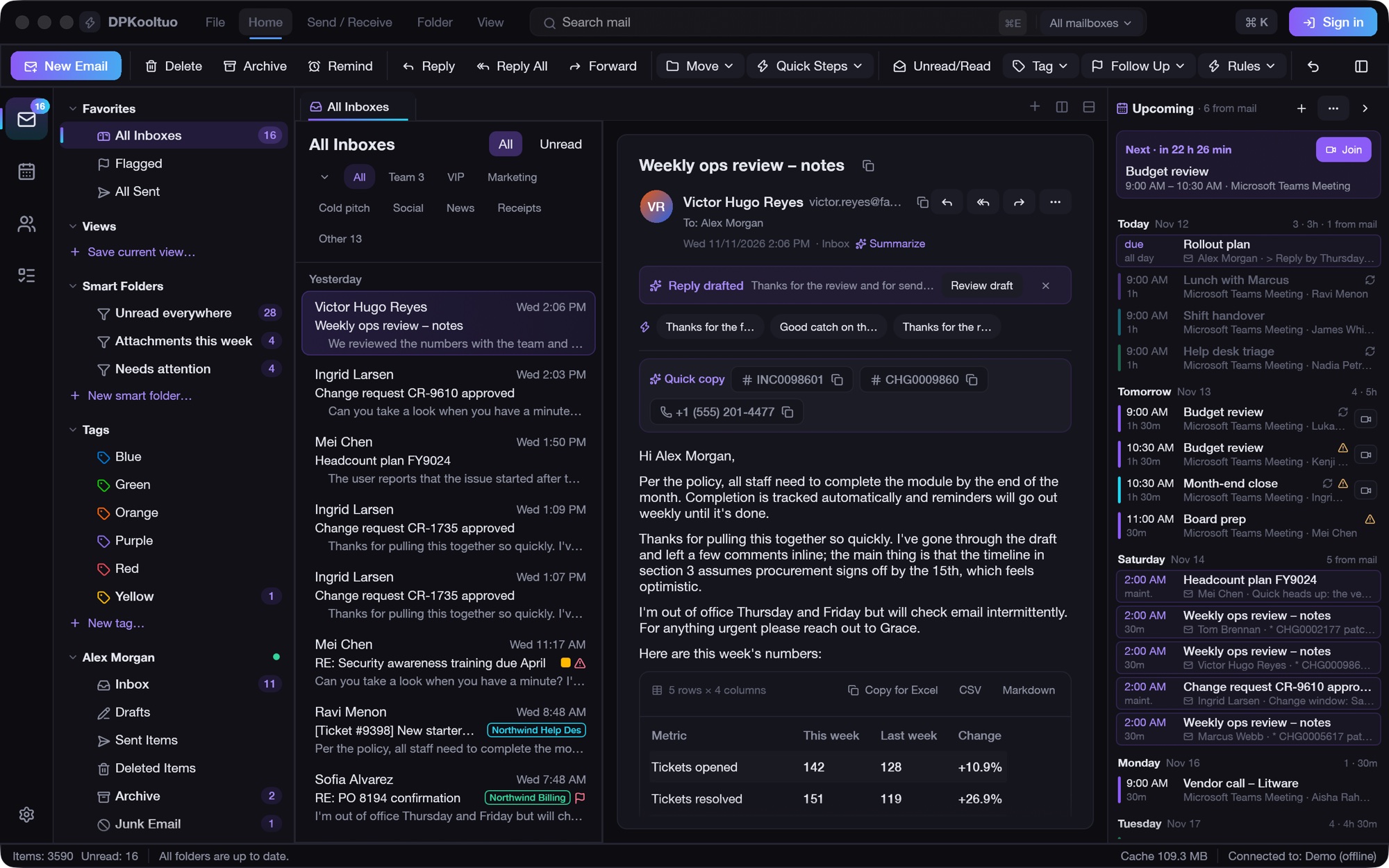
Feature support with DPXchange
| Capability | How it works | Status |
|---|---|---|
| Mail folders and messages | IMAP, with offline reading, search, rules, tags and smart folders | Supported |
| Calendar | EWS; create, change, answer and delete through an offline queue | Supported |
| Contacts | EWS, synchronized both ways | Supported |
| Tasks | EWS, the mailbox's task list | Supported |
| Sending | Handed to the server over EWS, which delivers it and files the copy in Sent Items; SMTP ports are not needed | Supported |
| Shared mailboxes | Lists the shared mailboxes you belong to; opens them with your own sign-in and sends as the shared address | Supported |
| Passkeys, authenticator codes, Microsoft 365 | Browser sign-in on the server's “connect a mail program” page; DPKooltuo receives a sign-in for that computer only and never sees the password or passkey | Supported |
| Connected program management | Each DPKooltuo installation appears under Sign-in and security ▸ Connected mail programs, where it can be removed | Supported |
| Offline use | Mail, calendar and people cached locally; changes and outgoing mail are queued until the connection returns | Supported |
| AI assistant | Summaries, drafted replies and labels; off until enabled, using the provider the organization chooses | Optional |
| Shared server rules | Rules marked “Run on the server” run on DPXchange even when no app is open, and are the same list DPXchange Mail shows; rules made in DPXchange Mail can be managed from DPKooltuo. Server rules can't forward mail | Supported |
| Diagnostics | dpkooltuo dpx-check you@domain reports the server, folders, events, tasks and contacts; --write-test, --browser, --shared and --rules extend the check | Supported |
Working alongside Microsoft 365
DPXchange is designed for organizations that already use Microsoft Entra ID, and supports a gradual move rather than a single cut-over.
| Area | Support |
|---|---|
| Directory | Users imported from Microsoft Entra ID in the background, with filtering by account type and licence. |
| Sign-in | Users can keep signing in with their Microsoft 365 account; administrators sign in to the console with Entra ID. |
| Phased migration | Departments can move one at a time; DPKooltuo shows Microsoft 365 and DPXchange mailboxes together. |
| Shared links | OneDrive and SharePoint links in outbound mail can be managed and given an expiry. |
Known limitations
These points are worth knowing when planning a deployment.
| Topic | Detail |
|---|---|
| Mail program sign-in | IMAP, EWS and ActiveSync accept the mailbox password only. Authenticator codes protect browser sign-in. DPKooltuo's browser connection is the way to use stronger methods from a desktop client. |
| Address lookup over EWS | The global address list spans all domains for Outlook and web mail, but EWS name resolution searches only the user's own domain. |
| Online meetings | Meetings carry links to the provider of your choice. DPXchange does not create Teams, Zoom or Webex meetings through their APIs. |
| BIMI logos | The logo is published, but without a Verified Mark Certificate. Gmail and Apple Mail show BIMI logos only when a certificate is present. |
| Managed sharing links | Expiry controls the DPXchange link. The original share on the provider's service is not revoked. |
Evaluate DPXchange for your organization
Dual Path can review your current Exchange Online or Microsoft 365 setup and plan a phased move.