DPXchange is a mail server you can actually reach. DPKooltuo is the desktop mail client that goes with it. Together they replace Exchange Online and Outlook, and they have never once asked you to try the "new" version of themselves.
Yes, "Kooltuo" is "Outlook" backwards. We were going for subtle and missed.

At 11:17 this morning, Central time, Microsoft's mail stopped answering for a great many organizations, and for people on outlook.com too. Here is how the day went for a typical office.
# what a mail client saw on Nov 12 GET graph.microsoft.com/v1.0/me 200 OK 0.3 s (they know who you are) GET …/me/mailFolders 502 Bad Gateway 21.2 s (they don't know where your mail is) GET …/me/calendar 502 Bad Gateway 21.3 s GET …/me/contacts 502 Bad Gateway 22.0 s GET …/me/todo/lists no answer 40 s (your to-do list is: wait) # the same afternoon, on DPXchange $ dpkooltuo dpx-check you@yourcompany.com mail 7 folders over IMAP events read, created, changed, deleted send delivered # riveting stuff
Top half: real responses we logged that afternoon. Bottom half: the same kind of check against DPXchange, tidied up. Just as real, far more boring.
We asked ourselves to be objective. We declined.
| Exchange Online + Outlook | DPXchange + DPKooltuo | |
|---|---|---|
| When it's down | You, and a large share of the planet, refresh a status page together. It's a bonding experience. | It's your server. You can look at it. If something is wrong you call a person, and the person has a name. |
| Where your mail lives | "A region." | A server you chose, at an address you can type. |
| How many Outlooks | Classic Outlook, new Outlook, Outlook on the web, Outlook (new) for Windows, and one more by the time you finish this row. | One client. It opens before your coffee is done. It will not ask you to try a different one. |
| Licensing | Business Basic, Standard, Premium, E1, E3, E5, F1, F3, plus add-ons. A flowchart is available. So is a consultant. | How many mailboxes do you have? That many. |
| The admin center | Moved. The page that told you where it moved has also moved. | One console. Mailboxes, domains, DNS checks and a mail trace that says what happened in plain words. |
| Signing in | Works great, even when the mail behind it doesn't. | Passkeys, an authenticator app, or your existing Microsoft 365 account. Irony noted. |
| AI | A button appears in your toolbar. Then in your invoice. | Off until you turn it on, and it runs on the AI your organization picks. |
| Offline | "Working offline" is a mode. Today it was a lifestyle. | Your mail is cached on your computer. Reading and searching keep working, and what you send goes out when the line is back. |

Mail, calendar, contacts and tasks for your whole organization, speaking the protocols your phones and programs already know.
IMAPExchange Web ServicesActiveSyncAutodiscoverDKIM
Shared mailboxes, team mailboxes people can set up themselves, rules, snooze and send-later. Revolutionary feature: it delivers.
Passkeys, authenticator codes with recovery codes, and sign-in with your Microsoft 365 account for the people you haven't told yet.
"Delivered." "Deferred, their server is busy." "Rejected, here is why." No header archaeology, no PowerShell séance.
Add a domain and the console tells you which records are right, which are wrong and exactly what to paste. Autodiscover included.
The whole Exchange set, in the browser and in your mail program. Meeting invites work. We checked, because of the cake.
Each mail program gets its own sign-in for one mailbox, never your password. Lost a laptop? Remove that one program. Done.
A native desktop mail client for Mac and Windows. It works with DPXchange, and also with Microsoft 365, Gmail, Proton and Zoho, for anyone leaving in stages.
Opens in a blink and searches your whole mailbox as you type. There is no splash screen because there is no time for one.
Everything is cached on your computer. On a day like today you would still have had every message you already owned.
Shared mailboxes side by side, split inbox, saved views, rules, tags and smart folders that follow you between computers.
Summaries, drafted replies and auto labels. It stays off until you turn it on, and it uses the AI your organization chooses.
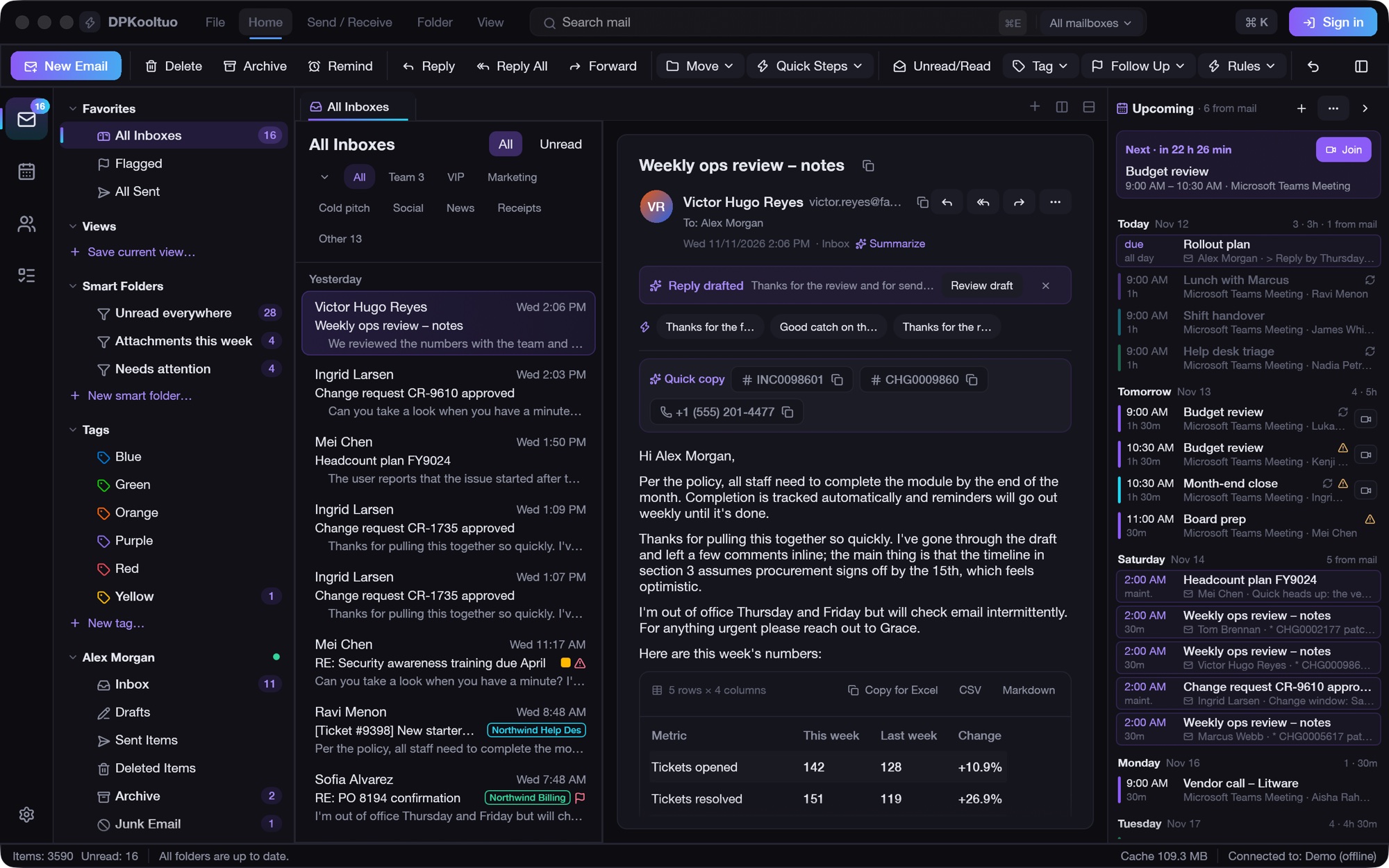
Your next meeting with a countdown, plus likely events it spotted in your mail. "Thursday at 2 works" becomes a calendar entry in one click.
There is no "new DPKooltuo" toggle. If we ever ship one, you have our permission to go back to Outlook.

DPKooltuo with demo data. No real inboxes were harmed, or even opened, in the making of this page.
We promised the marketing department we'd be positive. We don't have a marketing department.
Yes. It is a computer. The difference is that it is your computer's problem, with a person you can call, and not a weather system affecting several continents that you learn about from social media.
No. DPKooltuo reads Microsoft 365 and DPXchange mailboxes side by side, and people can keep signing in with their Microsoft 365 account. Move a department, see how it goes, enjoy the quiet.
Yes. DPXchange speaks ActiveSync, IMAP and Autodiscover, so the mail app already on the phone can find its own settings.
Passkeys and authenticator codes for sign-in, DKIM-signed mail, and per-program sign-ins you can revoke one at a time. Your password never has to leave your browser.
Affectionately. Running mail for a large part of the world is genuinely hard, and the people fixing it today had a worse Thursday than you did. We just think your mail shouldn't have to share their Thursday.
DPXchange because it exchanges mail. DPKooltuo because someone held "Outlook" up to a mirror at 2 AM and nobody stopped them.
Boring is the feature. Mail goes in, mail comes out, nobody refreshes a status page.
If you are reading this in an email, congratulations: yours is working.